syntranova.
Direct Contact
hello@syntranova.ai
Response < 24h
Domains
🇷🇴 syntranova.aisyntranova.ai
SYNTRANOVA AL LTD · HE 485824
Nicosia, Cyprus
← SaaS · Hospitality
Ospitessa

Ospitessa, the complete platform for hotels, guesthouses and restaurants

Ospitessa is a platform for hotels, guesthouses, serviced apartments and restaurants. We designed and developed everything a property needs in one account: front desk and calendar, direct bookings, sales channels, online check-in, payments, invoicing, a complete restaurant, housekeeping, team management and an AI receptionist that answers the phone and the chat.

Year
2026
Duration
A Syntranova project, designed and developed entirely by our team
Status
LIVE
Ospitessa
20
Modules for hotel and restaurant, in one account
150+
Sales channels in sync with the calendar
17
Languages the platform is presented in
24/7
AI receptionist on the phone and in chat
— ABOUT THE PROJECT

Ospitessa is a platform for hotels, guesthouses, serviced apartments and restaurants. We designed and developed it from scratch as a Syntranova project, with one goal: everything that happens in a property, from the guest's first question to the monthly package for the accountant, done from one place, simply and elegantly.

Reception works on a clear room calendar, rates are set per day and adjusted by automatic rules, and availability goes out by itself to Booking.com, Airbnb, Expedia and the other channels. Direct bookings come from the booking engine on the hotel's website, with no commission.

Guests have their own page on the phone: they check in online with their ID, pay, receive the door code and order room service. Communication with them goes out automatically, by email, SMS or WhatsApp, with messages that look like those of a luxury hotel.

The restaurant runs in the same account: a POS with the table plan, the kitchen display, modifiers, included meals for half board, a QR menu, delivery with zones and couriers, stock and recipes. Money is tracked end to end: payment links, deposits, no-shows, electronic invoicing, monthly invoices for companies, closing the day and the package for the accountant.

On top of it all sits an AI assistant anyone can use from day one: staff say what they want to do, and the platform prepares the action and carries it out only after confirmation, with each person's own permissions. And on the phone and in chat, an AI receptionist answers guests day and night, with real prices from the calendar.

01 · Front desk

Front desk and the room calendar

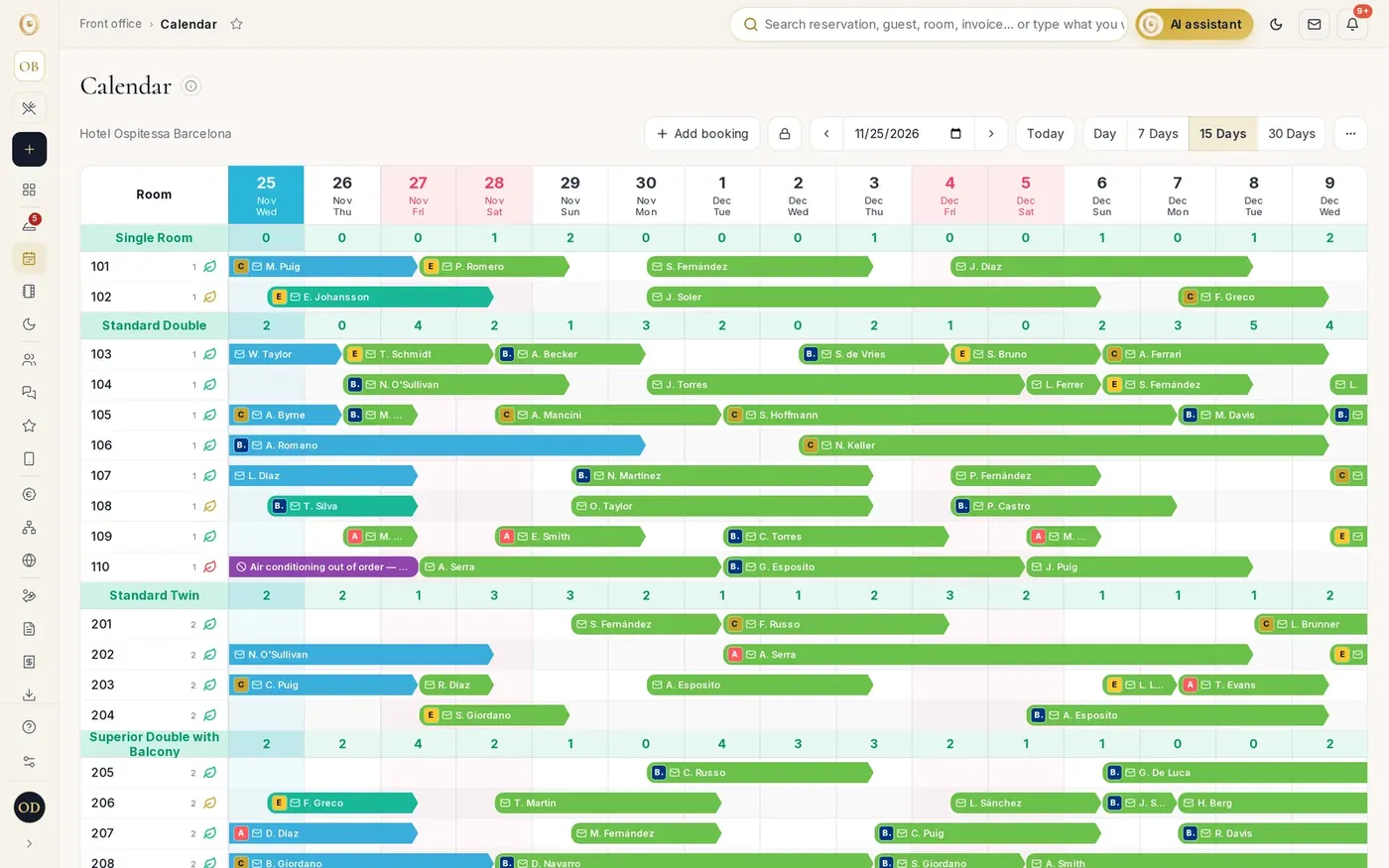
Every room on one screen, for one day, 7, 15 or 30 days. Reception sees at a glance who is arriving, who is leaving, which room is free and which booking still has a balance to collect, and a new booking opens pre-filled when you select a free period with the mouse.

  • Calendar by room type, with availability for every day
  • “Today at the front desk”: arrivals, departures, in-house guests, breakfast and blocked rooms
  • Check-in, check-out, room moves and extensions in a few clicks
  • The guest file: stay history, preferences, documents and payments
  • One search box for bookings, guests, rooms and invoices
The room calendar: every booking coloured by source and status
02 · Home dashboard

Anyone can use it from day one

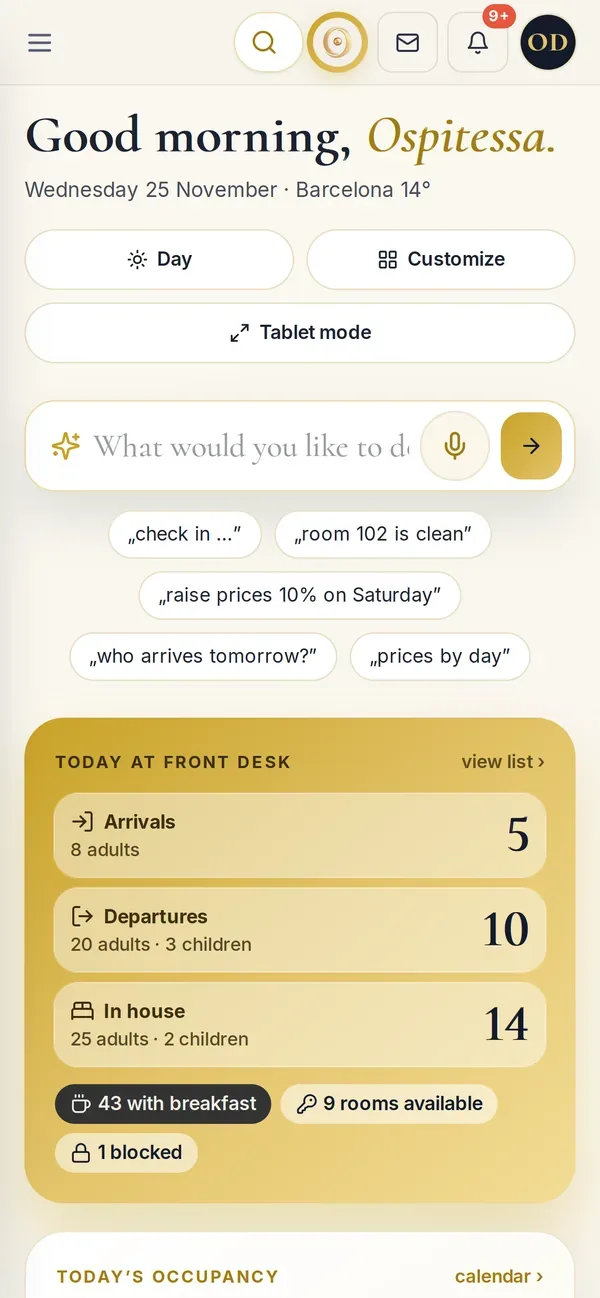
The Home dashboard shows the hotel's day like a luxury tablet: occupancy, revenue, arrivals, smart suggestions and what the AI assistant has handled. Staff do not need to learn menus: they say or type what they want, “check in Smith”, “room 102 is clean”, “raise the price by 10% on Saturday”, “who arrives tomorrow?”.

  • Voice or typed commands, in everyday words
  • The assistant shows what it will do and acts only after “Confirm”
  • Every command respects the permissions of the person giving it
  • Daily suggestions: rooms to prepare, unhappy guests, high-demand days
  • The daily report on WhatsApp for the owner, with replies straight from the message
The Home dashboard: the hotel's day, smart suggestions and the voice command bar
03 · Direct sales

Bookings and a commission-free direct booking engine

The hotel gets an elegant booking engine on its own website, linked in real time to the calendar. The guest chooses the room and rate plan, pays online and receives the confirmation instantly, and the booking appears at reception right away, with no commission to intermediaries.

  • Booking engine on the hotel website, on phone and desktop
  • A dashboard with direct sales, booking pace and rate parity
  • Offers sent by link and accepted by the client online
  • The complete booking: guests, plan, rate, invoicing and tasks
  • A professional hotel website with the booking engine included
The booking engine dashboard: direct sales, pace and rate parity
04 · Rates

Daily rates and automatic rules

A clear grid with the price of every room type, for every day and every plan: room only, breakfast included, non-refundable. Automatic rules adjust prices to occupancy, and the assistant answers questions about rates right next to the grid.

  • Derived rate plans: one plan follows another, plus or minus
  • Daily restrictions: minimum stay, closed to arrival or departure
  • Automatic occupancy rules, written as simple sentences
  • Contracts with their own rates for companies and agencies
  • Forecast and budget: what is already sold and where the month will end
Daily rates, with the AI assistant open next to the grid
05 · Channel manager

Sales channels in sync, with no overbooking

Availability, rates and restrictions go out automatically to Booking.com, Airbnb, Expedia and the other channels, and channel bookings drop straight into the calendar. A room sold in one place disappears instantly from all the others.

  • More than 150 sales channels, grouped and easy to search
  • Channel bookings arrive automatically, with the guest and the price
  • Guest messages from Booking.com, Airbnb and Expedia in the same inbox
  • The source of every booking, for accurate channel reports
  • One calendar: the same room can never be sold twice
Sales channels linked to the calendar, with the status of each connection
06 · Arrival

Online check-in, self check-in at the door, smart locks and codes

Guests can arrive at any time, even at night. They check in online with their ID, pay and receive the door code on their own guest page. On the hotel door, a QR poster shows the rooms free tonight, with booking and payment on the spot.

  • The guest page on the phone: the stay, the door code, requests and room service
  • ID scanning fills in the registration card, checked before saving
  • Smart locks, with an access code for every stay
  • A check-in kiosk on a tablet at reception
  • Self check-in at the door, for arrivals without a front desk
Smart locks by floor, with battery, signal and active codes
07 · Communication

Automated guest communication

Every step of the stay has its own message: booking confirmation, pre-arrival information, welcome, upgrade offers and the thank-you at departure. Emails look like those of a luxury hotel, with the hotel's photo and colours, and every message can go by email, SMS or WhatsApp.

  • The guest journey: each message switched on or off with a toggle
  • Luxury emails for every hotel, in the guest's language
  • SMS and WhatsApp for the important arrival details
  • Pre-arrival offers: upgrade, early check-in, late check-out
  • In-stay feedback reaches reception before it becomes a public review
Automated communication: which message goes out, when and on which channel
08 · Messages and AI

One inbox, with an AI receptionist on the phone and in chat

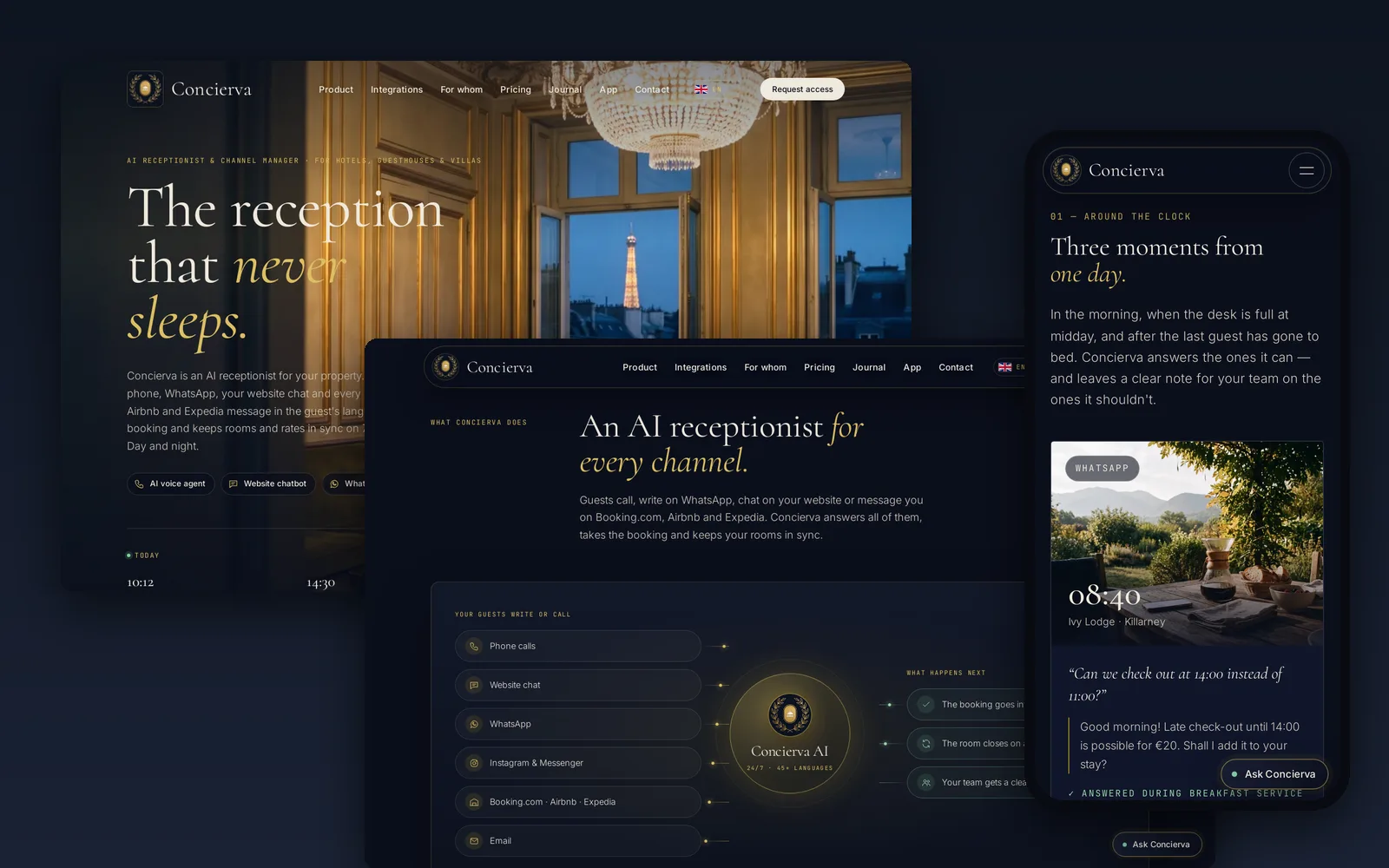
Calls, WhatsApp, website chat, email and messages from Booking.com and Airbnb all arrive in one place. The AI receptionist answers the phone and the chat day and night, in the guest's language, with real prices from the calendar, and every call can be played back, with the transcript and summary alongside.

  • One inbox for calls, WhatsApp, chat, email and channels
  • A voice agent on the hotel's number, with the voice and hours the hotel chooses
  • Bookings prepared by the AI and approved by reception in one click
  • Draft replies or automatic replies, chosen per channel
  • Payments, cancellations and complaints go to people, with the whole conversation
Calls handled by the AI: recording, transcript and summary next to the booking
09 · Payments

Online payments, deposits and no-shows

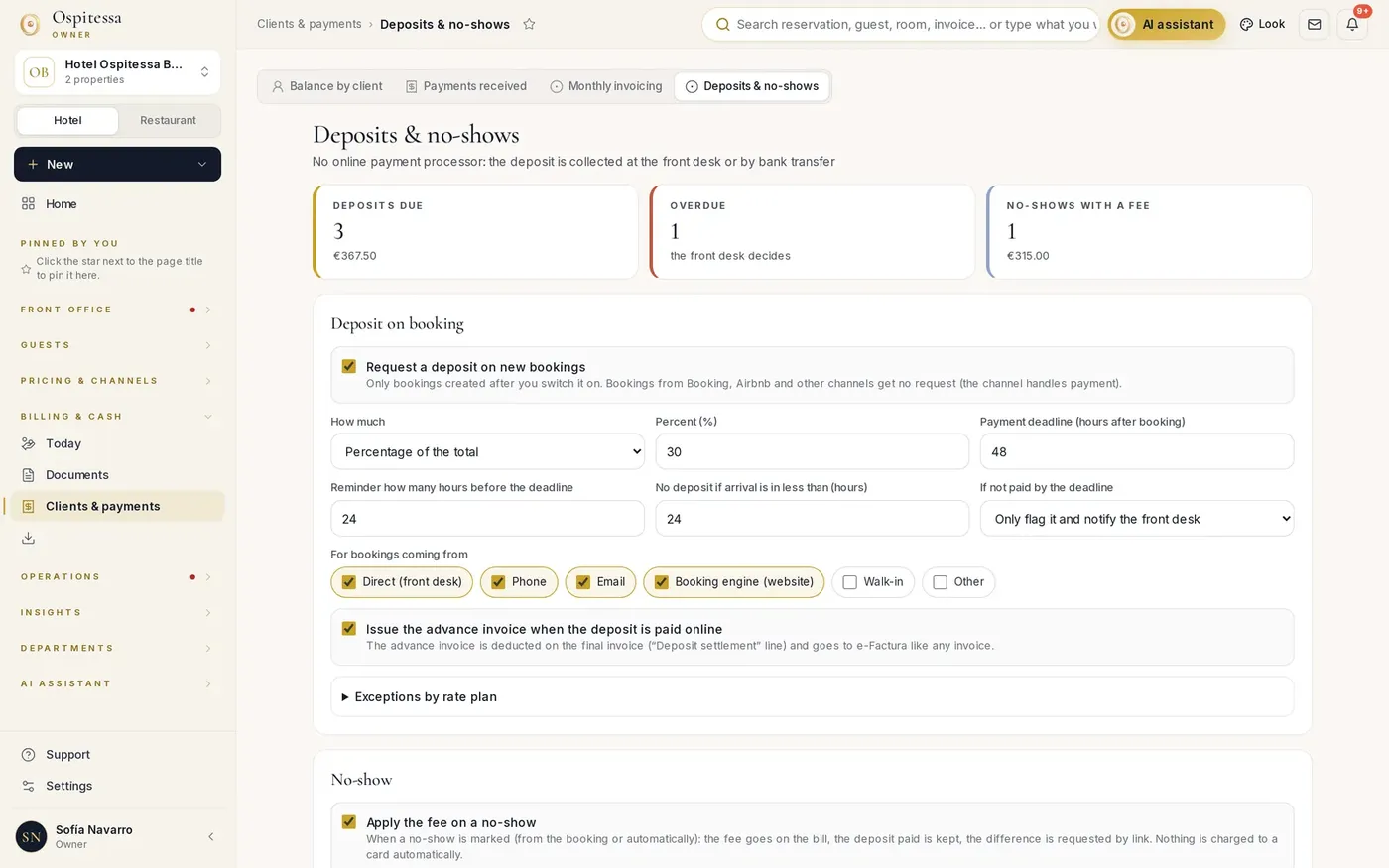
The hotel sends a payment link by WhatsApp, chat, email or SMS, with the amount calculated from the booking. The guest pays by card or from the phone, and the payment lands in the booking folio by itself, with the invoice and the door code following the hotel's rules. Deposits are requested automatically on new direct bookings.

  • Payment links with the amount calculated by the system, never typed by hand
  • Automatic deposits: a percentage, a fixed amount or the first night, with a deadline and a reminder
  • No-show penalties posted to the booking folio
  • Deposit invoices issued automatically on payment, following the hotel's rules
  • Refunds and the payment log, straight from the app
Deposits and no-shows: rules, deadlines and the status of every booking
10 · Invoicing

E-invoicing and monthly invoices for companies

Invoices are issued from the booking folio and sent as electronic invoices (e-Factura in Romania), with the status of every document visible in the app. Companies that stay often can be set to monthly billing: their staff check out without paying, and at the end of the month the company receives one invoice, with a line for every booking.

  • Invoices, pro formas and deposit invoices from the booking folio
  • Electronic invoicing and the status of every invoice
  • Company billing details filled in automatically from the tax ID
  • One monthly invoice per company, with the company's payment terms
  • City tax calculated per night, with no manual sums
Monthly billing for companies: the amount to invoice, due dates and one invoice per company
11 · Money

Cash desk, end of day and the package for the accountant

At the end of the day, reception sees everything collected, at the front desk and in the restaurant, by cash, card and transfer, and closes the day in three steps, with the checks done automatically. Every month the accountant receives a complete package, with invoices, payments and registers, in the format of the software they use.

  • Close the day in three steps, with arrivals and balances checked
  • Takings by day, payment method and department
  • The monthly package for the accountant, sent automatically on the chosen date
  • Exports for the accounting software the accountant uses
  • An accountant role with access to the money side only
“For the accountant”: the monthly package and the checks before closing
12 · Restaurant

A complete restaurant: POS, tables and the kitchen display

The restaurant works in the same account as the hotel. The waiter sees the table plan, opens the bill, adds items with modifiers and sends the order straight to the kitchen display. The bill can be charged to the guest's room, and with half board the included meal is applied automatically, so only the difference is paid.

  • The table plan by room, with the live status of every table
  • The kitchen display on a tablet, with the timer for every order
  • Modifiers: cooking, paid extras, “no onion”, size
  • Bills charged to the hotel room, straight from the POS
  • Included meals applied automatically for half board and full board
The restaurant POS: indoor and terrace tables, room service and the day's bills
13 · Delivery and QR menu

QR menu, online orders and delivery with zones and couriers

Customers order from the digital menu, at the table with a QR code or at home from the restaurant's ordering page. Delivery has zones with a fee, a minimum order and an estimated time, in-house couriers with the route on their phone, and the cash tracked for every courier.

  • QR menu with photos, allergens and automatic translations
  • Delivery zones by postcode, neighbourhood or distance
  • Couriers with their own phone screen and end-of-shift handover
  • Clear statuses: new, preparing, on the way, delivered
  • Delivery platforms Glovo, Bolt Food and Tazz: integration ready, activated with the partner account
The delivery monitor: orders, zones, couriers and takings
14 · Stock

Stock, recipes and the fiscal till

Every item sold is deducted from stock automatically, following its recipe. Goods receipts, minimum stock, purchase orders to suppliers and the margin on every product are one click away, and the fiscal receipt goes to the till linked to the restaurant.

  • Recipes with ingredients and automatic stock deduction
  • Goods receipts and stock levels by warehouse
  • Minimum stock and suggested orders to suppliers
  • Sales by product, with the cost and margin of each
  • Returns on paid bills; automatic voids on the fiscal till are ready and switched on after a test on the device
Minimum stock and reordering, with each product's preferred supplier
15 · Groups and events

Groups and rooming lists for weddings

For a wedding or a group, the organiser receives a form on the phone, with no account, to fill in the guest list. The hotel assigns rooms automatically, sees who pays for what and exports the list to Excel or PDF. Function rooms and events have their own calendar.

  • Rooming lists with Excel import and automatic room allocation
  • A form for the organiser, filled in from the phone
  • Group billing, or each guest pays for their own room
  • Allotments for agencies, with automatic release
  • The calendar of function rooms and events
A wedding rooming list: the organiser's form and the room allocation
16 · Housekeeping

Housekeeping and housekeepers by floor

The status of every room, floor by floor, updated in real time: dirty, clean, inspected, occupied. Housekeepers see their rooms on the phone, start cleaning with one button and report the minibar, problems or lost items, and reception knows at once which room can be given out.

  • A floor-by-floor board with the status of every room
  • My rooms: the housekeeper's list, on the phone
  • Minibar, maintenance issues and lost items reported from the room
  • Tasks by department, with response times
  • Today's departures prioritised for cleaning
Housekeeping by floor: every room with its status
17 · Team

Roles and permissions for every employee

Everyone on the team sees only what they need. Permissions are chosen like a menu, “What they see” and “What they can do”, and a preview shows exactly how the menu will look for that role. Ready-made templates cover reception, manager, housekeeper, waiter, kitchen and accountant.

  • A clear matrix of what every role can do
  • Templates for the usual hotel roles
  • A preview of the menu exactly as the employee sees it
  • An accountant with access to money only
  • An activity log for the team
Team and permissions: what each role can do
18 · Mobile

A phone app for staff, including the spa

The team works from the phone: housekeepers see their rooms, waiters take orders at the table, the manager follows the day from anywhere, and the spa has the therapists' schedule, appointments and services. Everyone sees the app according to their role.

  • An app for iPhone and Android, by role
  • Waiter: tables, orders and bills at the table
  • Housekeeper: rooms, minibar and issues
  • Spa: therapists' schedule, appointments and services
  • Notifications for new tasks
Spa and wellness: the therapists' schedule, hour by hour
19 · Insights

Reports and questions for the manager

The manager does not dig through tables: they ask a question and get the answer. The hotel pulse shows revenue, average rate, occupancy for the coming days and where bookings come from, and the forecast estimates where the month will end.

  • The hotel pulse: revenue, average rate, revenue per room, guest score
  • Occupancy for the coming days and booking sources
  • Forecast and budget, compared with last year
  • Reports phrased as simple questions
  • Statistics on the conversations handled by the AI
The hotel pulse: today, trends and what is worth doing
20 · Personalisation

Themes, colours and 17 languages

Every hotel chooses its look: Light for the day, Black for the night shift, Blue and other colour themes, with the accent and the hotel's own colour, also used in emails to guests. The platform is presented in 17 languages, and guests are served in their own language.

  • 8 colour themes, including Light, Black and Blue
  • Automatic day and night switching, at the hotel's hours
  • The hotel's colour for the whole team and for emails
  • Airy or compact density, as preferred
  • A presentation website in 17 languages, for hotels across Europe
The Black theme: the room calendar for the night shift

Want to see the platform in action?

The live demo opens without an account, on a demo hotel and restaurant.

See Ospitessa live ↗
— THE APP ON THE PHONE

Reception, the restaurant, housekeepers and guests, each with their own screens. Tap a screenshot to enlarge it.

The Home dashboard on the phone, with voice commands
The waiter: tables and bills, at the table
Housekeepers: their rooms and the cleaning
The guest page, with the door code
Pre-arrival offers: upgrade and early check-in
The restaurant's QR menu
Product modifiers, chosen in the POS
A call handled by the AI, with summary and transcript
— THE CHALLENGE

What needed to be solved.

  • !Small and mid-sized hotels juggle five or six separate programs
  • !Reception misses calls and messages, especially in the evening and at night
  • !Rates and availability are updated by hand on every channel
  • !New staff every season, with no time for training
  • !The restaurant and the hotel keep separate accounts for the same guest
  • !Invoicing, deposits and month-end closing take hours of manual work
— THE SOLUTION

How we solved it.

  • ✓One platform for front desk, channels, payments, restaurant and team
  • ✓An AI receptionist on the phone and in chat, with real prices from the calendar
  • ✓A built-in channel manager: a room sold anywhere disappears everywhere instantly
  • ✓Voice and typed commands, confirmed before they run
  • ✓Restaurant bills charged to the room and included meals applied automatically
  • ✓Deposits, electronic invoices, monthly invoices and the accountant's package, automatically
— DELIVERED FEATURES

What the delivery included.

What we designed and developed in the platform, module by module.

◆The room calendar and “Today at the front desk”
◆The Home dashboard with confirmed voice commands
◆A commission-free direct booking engine
◆Daily rates, rate plans and automatic rules
◆A channel manager with more than 150 channels
◆Online check-in, self check-in at the door and access codes
◆Automated communication by email, SMS and WhatsApp
◆One inbox and an AI receptionist on the phone and in chat
◆Payment links, deposits and no-shows
◆Electronic invoicing and monthly invoices for companies
◆Closing the day and the package for the accountant
◆Restaurant: POS, kitchen display, QR menu, delivery, stock and recipes
◆Groups and rooming lists for weddings
◆Housekeeping by floor and the housekeepers' app
◆Roles and permissions for every employee
◆A phone app for staff, including the spa
◆Reports, forecast and questions for the manager
◆8 colour themes and a presentation in 17 languages
— RESULTS

Numbers that matter.

What the platform changes in the daily work of a hotel and a restaurant.

One account

The hotel and the restaurant work together, on the same bookings and the same guest

From day one

Staff say what they want to do, and the assistant prepares the action and asks for confirmation

Round-the-clock reception

The AI receptionist handles calls and messages and prepares bookings for reception

No overbooking

One calendar keeps rooms, rates and restrictions in sync on every channel

Money tracked end to end

From the payment link to electronic invoicing and the accountant's monthly package

A luxury look

Colour themes, elegant emails and a guest page worthy of the hotel

Want to be the next case study?

Free discovery call + estimate within 24h.